



Centre d'assistance
Assistance produit
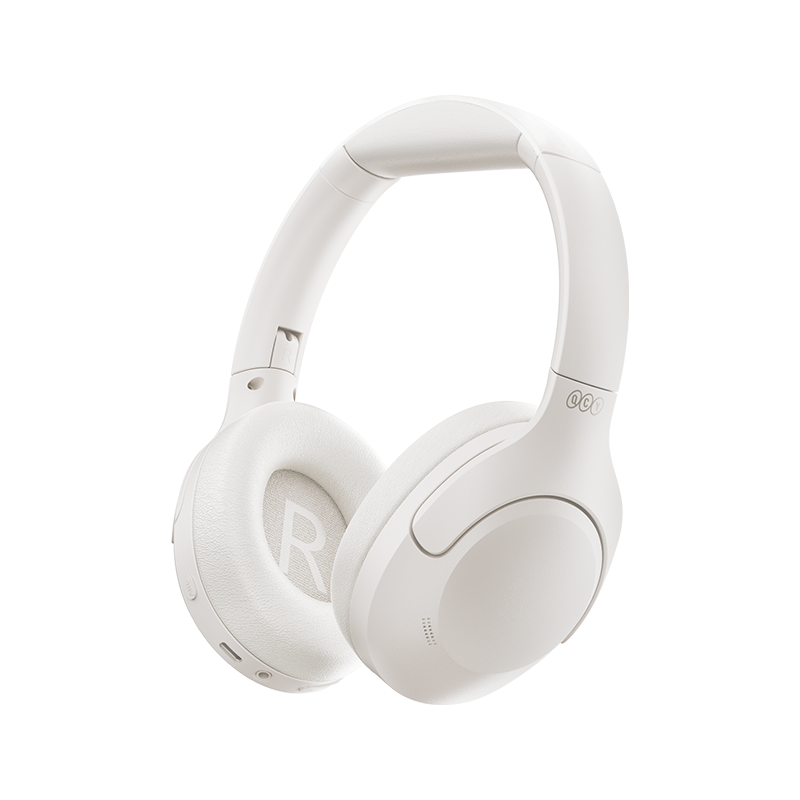
H3 Lite
Accédez aux guides produits, aux solutions de dépannage, aux manuels et au service client.
Vidéo d'aide
FAQ
Pourquoi l'application QCY demande-t-elle l'accès à la localisation ?
L'application elle-même n'a généralement pas besoin d'accéder à la localisation. Cependant, lorsque la technologie Bluetooth Low Energy (BLE) est utilisée pour localiser vos écouteurs, Android exige l'autorisation d'accès à la localisation.
Si vous préférez ne pas partager votre position, fermez l'application et réessayez de vous connecter.
Que dois-je faire si mes écouteurs n'apparaissent pas dans l'application QCY ?
1. Appairez les écouteurs avec votre téléphone.
2. Ouvrez l'application QCY, faites défiler vers le bas, puis cliquez sur " Ajouter des appareils "."
3. Si " H3 Pro " s'affiche, sélectionnez-le pour vous connecter.
4. Si ce n'est pas le cas, cliquez sur " Configuration manuelle " et sélectionnez " H3 Pro " dans la liste pour vous connecter.
La batterie de mon casque s'épuise trop vite. Que puis-je faire ?
Pour prolonger l'autonomie de la batterie de vos écouteurs, suivez ces conseils :
- Baisse le volume.
- Désactiver la réduction active du bruit (ANC)
- Désactivez les fonctionnalités intelligentes et l'audio spatial.
- Éteignez le casque lorsque vous ne l'utilisez pas.
Que puis-je faire si mon casque ne se connecte pas à mon appareil ?
1. Effacez les enregistrements d'appairage entre le casque et tous les appareils précédents.
2. Reconnectez votre casque à l'appareil.
Si cela ne fonctionne pas :
- Essayez de le coupler avec un autre appareil pour vérifier s'il y a des problèmes de compatibilité.
- Assurez-vous qu'aucun objet ne bloque le signal Bluetooth.
Comment puis-je activer la connexion multipoint ?
Pour connecter deux appareils :
Étape 1. Appairez le casque avec l'appareil A.
Étape 2. Désactivez le Bluetooth sur l'appareil A ; le casque passera alors en mode appairage.
Étape 3. Appairez le casque avec l'appareil B.
Étape 3. Réactivez le Bluetooth sur l'appareil A et reconnectez-vous au casque.
Une fois cette configuration initiale effectuée, le casque se connectera automatiquement aux deux appareils la prochaine fois.
Comment réinitialiser un casque audio ?
Pour réinitialiser le H3 Lite :
1. Appuyez simultanément sur les boutons VOL+ et VOL- et maintenez-les enfoncés pendant 10 secondes
2. La LED du casque clignotera trois fois en rouge, ce qui indique que la réinitialisation a bien eu lieu.
Que dois-je faire si le son de mes écouteurs est saccadé ?
Veuillez noter que cela ne signifie pas nécessairement que le problème provient des écouteurs eux-mêmes, mais qu'il peut être lié à l'appareil connecté ou à votre environnement. Les signaux Bluetooth peuvent être perturbés par des obstacles tels que des murs, des appareils électroménagers, des interférences Wi-Fi, etc. Pour garantir une connexion stable, essayez de réduire au maximum ces obstacles.
Pour résoudre ce problème, suivez les étapes de dépannage suivantes :
1. Rechargez complètement votre casque et réinitialisez-le
2. Vérifiez les performances en écoutant de la musique ou en regardant des vidéos téléchargées afin d'éviter d'éventuels problèmes de streaming.
3. Testez le casque avec un autre appareil Bluetooth dans un autre endroit pour voir si le problème persiste.
Quelle est la différence entre connecter le H3 Pro via un câble AUX et utiliser le Bluetooth ?
Lorsque vous utilisez le câble AUX, vous pouvez toujours profiter de la fonction ANC, mais le casque s'éteindra et la puce Bluetooth cessera de fonctionner. Les principales différences sont les suivantes :
- L'application ne parvient pas à se connecter, et les réglages d'égaliseur (préréglages et personnalisés) sont désactivés.
- La connexion AUX ne consomme pas d'énergie de la batterie, car le casque est alimenté par le câble.
- Il n'y a aucun décalage lorsque l'on utilise le câble AUX.
Comment mettre à jour le micrologiciel ?
Mettez à jour le micrologiciel via l'application QCY. Avant la mise à jour :
1. Assurez-vous que votre casque dispose d'au moins une batterie 20%.
2. Assurez-vous que les deux écouteurs sont connectés à l'application QCY.
3. N'utilisez pas les écouteurs pendant la mise à jour.
4. Laissez les écouteurs dans leur boîtier de recharge, le couvercle ouvert.
Que puis-je faire si le volume est faible lorsque je me connecte à mon téléphone ?
Essayez de reconnecter vos écouteurs : effacez l'historique des appairages sur votre téléphone, puis reconnectez les écouteurs à votre appareil.
Pourquoi mon interlocuteur ne m'entend-il pas, ou pourquoi ma voix n'est-elle pas claire ?
Nous vous recommandons de suivre les étapes suivantes :
- Vérifiez que le périphérique de sortie audio de votre téléphone est réglé sur " QCY H3 Lite "
- Si vous passez l'appel via une application, essayez de passer un appel directement à l'aide de la fonction d'appel standard de votre téléphone pour vérifier si le problème persiste.
- Testez vos écouteurs avec un autre appareil Bluetooth dans un autre environnement pour voir si le problème s'atténue.
Que puis-je faire si la qualité sonore du casque laisse à désirer ?
Vous pouvez suivre les étapes de dépannage suivantes :
- Vérifiez la source audio : testez différents types de musique et assurez-vous que le son est clair et exempt de distorsion ou de bruit.
- Personnalisez les réglages de l'égaliseur : utilisez l'application QCY pour tester différents modes d'égalisation ou personnaliser le profil sonore selon vos préférences.
Qu'est-ce que la réduction adaptative du bruit ?
Surveillance en temps réel des changements environnementaux et des fuites sonores afin d’ajuster les capacités de réduction du bruit. Grâce à la réduction adaptative du bruit, vous bénéficiez d’une réduction optimale du bruit et d’une tranquillité maximale. Veuillez noter que cette fonctionnalité est désactivée par défaut et qu’elle peut être activée via l’application QCY.
Manuels
Vous avez encore besoin d'aide ?
 Appelez-nous+1 (917) 807-6754
 Envoyer vos commentairesEnvoyer ici
 Discutez avec nous
 Service clientservice@qcyearphone.com
 Marketing et partenariatsrice@qcyearphone.com
 Demandes de pressepr@qcyearphone.com