



Centre d'assistance
Assistance produit
QCY MeloBuds N70
Accédez aux guides produits, aux solutions de dépannage, aux manuels et au service client.
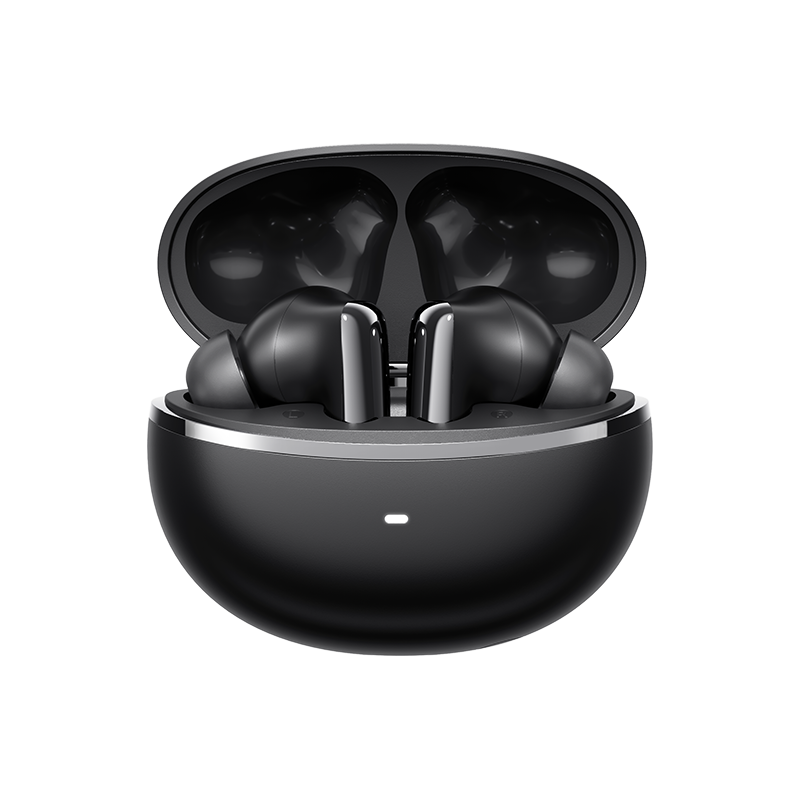
Vidéo d'aide
FAQ
Comment puis-je mettre à jour le micrologiciel ?
Mettez à jour le micrologiciel via l'application QCY
Procédure : Ouvrez l'application QCY - Paramètres - Mise à jour du micrologiciel - Cliquez sur « Mettre à jour »
Comment se connecter à l'application QCY ?
1. Téléchargez l'application QcY.
L'application QCY est disponible sur les appareils iOS et Android. Elle peut être installée depuis le Google Play Store ou l'App Store d'Apple.
2. Connectez les écouteurs QCY à votre appareil via Bluetooth (par exemple, un smartphone ou une tablette)
3. Utilisez l'application QCY pour profiter pleinement de votre produit.
Et si l'écran tactile était trop sensible ?
Vous pouvez régler la sensibilité des commandes tactiles du casque depuis l'application.
Chemin d'accès : Ouvrez l'application QCY - Paramètres - Réglage de la sensibilité
Pourquoi l'application QCY demande-t-elle l'accès à la localisation ?
L'application elle-même n'a généralement pas besoin d'accéder à la localisation. Cependant, lorsque la technologie Bluetooth Low Energy (BLE) est utilisée pour localiser vos écouteurs, Android exige l'autorisation d'accès à la localisation.
Si vous préférez ne pas partager votre position, fermez l'application et réessayez de vous connecter.
Quelle est l'autonomie de la batterie du casque ?
L'autonomie totale de la batterie est de 54 heures, et le boîtier de recharge permet jusqu'à 10 heures d'utilisation avec une seule charge.
Comment puis-je vérifier le niveau de batterie des écouteurs ?
Appairez les écouteurs avec l'application QCY sur votre téléphone pour vérifier le niveau de batterie.
Que dois-je faire si les écouteurs ne s'allument pas lorsque je les sors de leur boîtier de recharge ?
Il se peut que votre casque soit déchargé. Veuillez utiliser un chargeur de 5 V pour le recharger pendant deux heures.
Pourquoi les niveaux de batterie des écouteurs gauche et droit ne correspondent-ils pas ?
En raison des différences d'habitudes d'utilisation et de l'état variable des batteries entre l'oreillette gauche et l'oreillette droite, il est normal qu'il y ait une certaine différence de consommation d'énergie entre les deux oreillettes pendant leur utilisation.
Comment réinitialiser le HT18 ?
Une fois les écouteurs placés dans le boîtier de recharge, ouvrez ce dernier et maintenez le bouton enfoncé pendant 10 secondes. Le boîtier de recharge clignotera alors alternativement en rouge et en blanc pendant 3 secondes. Lorsque le clignotement cesse, la réinitialisation est terminée.
Après avoir réinitialisé les paramètres d'usine, connectez-vous en suivant la procédure d'appairage initiale, puis utilisez l'appareil normalement.
Que faire si mon casque n'apparaît pas dans la liste Bluetooth de mon téléphone dès la première tentative ?
Veuillez réinitialiser votre casque, puis le reconnecter ; vous devriez alors pouvoir le détecter.
Est-il possible de coupler séparément les écouteurs gauche et droit avec deux appareils différents ?
Non, ce n'est pas possible. Les écouteurs peuvent être connectés à deux appareils à la fois grâce à la fonction « Dual Connection », mais ils ne peuvent diffuser le son que d'un seul appareil à la fois.
Les clips pour l'oreille gauche et l'oreille droite peuvent-ils être utilisés séparément ?
Oui, ils peuvent être utilisés dès leur sortie du boîtier, même si vous ne retirez qu'un seul écouteur.
Comment puis-je activer la connexion multipoint ?
Pour connecter deux appareils :
1. Appairez le casque avec l'appareil A.
2. Désactivez le Bluetooth sur l'appareil A ; le casque passera alors en mode d'appairage.
3. Appairez le casque avec l'appareil B.
4. Réactivez le Bluetooth sur l'appareil A et reconnectez-vous au casque.
Une fois cette configuration initiale effectuée, le casque se connectera automatiquement aux deux appareils la prochaine fois.
Comment nettoyer mes écouteurs ?
1. Nettoyage des broches de contact :
Assurez-vous que le boîtier de recharge est débranché de toute source d'alimentation.
Nettoyez les contacts de recharge de vos écouteurs et de leur boîtier de recharge à l'aide d'un coton-tige imbibé d'alcool.
2. Nettoyage des filtres des écouteurs :
Commencez par retirer les embouts des écouteurs.
.Utilisez une brosse à poils souples pour nettoyer le filtre à poussière et l'évent acoustique de votre casque.
Comment dois-je entretenir mes écouteurs ?
1. Utilisez régulièrement vos écouteurs pour éviter une décharge excessive de la batterie. Essayez de les utiliser au moins une fois par mois.
2. Rechargez les écouteurs après chaque utilisation et n'attendez pas que leur niveau de charge descende en dessous de 20% pour les recharger.
3. Ouvrez le boîtier au moins une fois par mois pour vérifier que tout fonctionne correctement, et rechargez-le tous les mois.
4. Nettoyez régulièrement les broches de recharge des écouteurs et du boîtier.
5. Veillez à ce que les embouts restent propres et essuyez la grille métallique avec de l'alcool à 70°.
6. S'ils sont mouillés, utilisez un sèche-cheveux réglé sur la position ' froid ' pour les sécher.
Que puis-je faire si mes écouteurs tombent facilement ?
Nous proposons différentes tailles d'embouts afin de garantir un bon maintien. Pour trouver la taille qui vous convient le mieux :
1. Assurez-vous de porter les écouteurs de bonne côté (vérifiez les logos L et R).
2. Essayez différentes tailles d'embouts.
3. Tournez légèrement les écouteurs pour trouver la position la plus stable et la plus confortable.
Puis-je acheter un seul écouteur si j'en ai perdu un ?
Malheureusement, en raison de problèmes liés aux frais d'expédition et aux droits de douane, nous ne pouvons pas vendre le boîtier de recharge séparément.
Que faire si la réduction du bruit n'est pas efficace ?
1. Le HT18 offre une qualité sonore Hi-Fi ultra-haute définition. Notre HT18 est équipé de haut-parleurs MEMS, qui améliorent considérablement les hautes et ultra-hautes fréquences. Cependant, cette amélioration des hautes fréquences limite quelque peu les performances du HT18 en matière de réduction du bruit dans les hautes fréquences.
2. Veuillez sélectionner un autre mode de réduction du bruit dans l'application QCY (autre que le mode adaptatif). Vous obtiendrez ainsi le même résultat qu'avec le modèle HT08.
Si la réduction de bruit reste inefficace, vous pouvez désactiver le mode de réduction de bruit adaptatif et passer en ' mode bruyant ' dans l'application, en réglant la profondeur de réduction de bruit au maximum.
Le mode adaptatif ajuste le niveau de réduction du bruit en fonction des conditions environnementales (plus le bruit ambiant est fort, plus la réduction du bruit est importante ; plus le bruit ambiant est faible, plus la réduction du bruit est modérée), offrant ainsi une expérience de réduction du bruit plus confortable et réduisant la sensation de pression dans les oreilles dans les environnements adaptés.
Que puis-je faire si le volume est faible lorsque je me connecte à mon téléphone ?
Nettoyage du filtre à poussière :
Utilisez une brosse à dents sèche pour nettoyer délicatement le filtre à poussière des écouteurs. Veillez à ne pas exercer une pression trop forte afin de ne pas les endommager.
Pourquoi le son ne sort-il que d'un seul côté des écouteurs ?
Il se peut que vos écouteurs ne soient pas synchronisés. Veuillez les réinitialiser.
Manuels
Vous avez encore besoin d'aide ?
 Appelez-nous+1 (917) 807-6754
 Envoyer vos commentairesEnvoyer ici
 Discutez avec nous
 Service clientservice@qcyearphone.com
 Marketing et partenariatsrice@qcyearphone.com
 Demandes de pressepr@qcyearphone.com