



サポートセンター
製品サポート
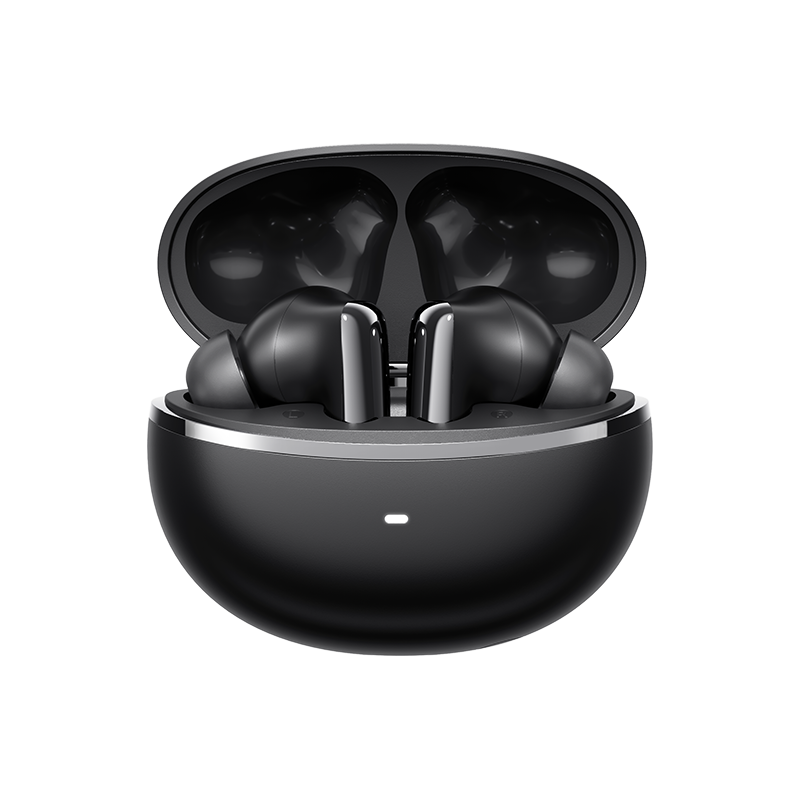
QCY MeloBuds N70
製品ガイド、トラブルシューティングの解決策、取扱説明書、およびカスタマーサポートをご覧ください。.
サポート動画
よくある質問
ファームウェアの更新方法は?
QCYアプリでファームウェアを更新する
手順:QCYアプリを開き、「設定」→「ファームウェアの更新」の順に選択し、「更新」をタップします。
QCYアプリへの接続方法は?
1. QcYアプリを入手してください。.
QCYアプリは、iOSおよびAndroid端末でご利用いただけます。Google PlayストアまたはApple App Storeからインストールできます。.
2. QCYのイヤホンを、お使いのデバイス(スマートフォンやタブレットなど)とBluetoothで接続してください。
3. QCYアプリを利用して、製品体験をさらに充実させましょう。.
タッチスクリーンの感度が強すぎる場合はどうすればいいですか?
アプリ内で、ヘッドホンのタッチ操作の感度を調整できます。.
手順:QCYアプリを開く - 「設定」 - 「感度調整」
QCYアプリはなぜ位置情報のアクセスを要求するのですか?
通常、このアプリ自体に位置情報のアクセス権は必要ありません。ただし、Bluetooth Low Energy(BLE)を使用してイヤホンを探す場合、Androidでは位置情報のアクセス権が必要となります。.
位置情報の共有を希望されない場合は、アプリを閉じてから、再度ペアリングをお試しください。.
ヘッドホンのバッテリーはどれくらい持ちますか?
バッテリーの総持続時間は54時間で、充電ケースは1回の充電で最大10時間の使用が可能です。.
イヤホンのバッテリー残量はどのように確認すればよいですか?
イヤホンをスマートフォンのQCYアプリとペアリングして、バッテリー残量を確認してください。.
充電ケースからイヤホンを取り出しても電源が入らない場合は、どうすればよいですか?
ヘッドホンのバッテリーが切れている可能性があります。5Vの充電器を使用して、2時間充電してください。.
なぜ左右のイヤークリップのバッテリー残量が一致しないのですか?
左右の耳での使用習慣の違いやバッテリーの状態のばらつきにより、使用中に左右のイヤホン間でバッテリー消費量に多少の差が生じることは正常です。.
HT18をリセットするにはどうすればよいですか?
イヤホンを充電ケースに入れた状態で、ケースを開き、充電ケースのボタンを10秒間長押ししてください。すると、充電ケースのランプが3秒間、赤と白の光を交互に点滅させます。点滅が止まれば、リセットは完了です。.
工場出荷時の設定に戻した後、最初のペアリング方法に従って接続し、通常通りご利用ください。.
初めて接続しようとした際、スマートフォンのBluetoothリストにヘッドフォンが表示されない場合はどうすればよいですか?
ヘッドフォンをリセットしてから、再度接続してください。そうすれば、ヘッドフォンが検出されるはずです。.
左右のイヤークリップを、それぞれ別のデバイスとペアリングすることはできますか?
いいえ、できません。「デュアルコネクション」機能を使えば、イヤークリップを2台のデバイスに同時に接続することはできますが、一度に再生できるのは1台のデバイスからの音声のみです。.
左右のイヤークリップは別々に使用できますか?
はい、ケースから取り出した直後からそのまま使用できます。片方のイヤホンだけを取り出した場合でも同様です。.
マルチポイント接続を有効にするにはどうすればよいですか?
2つのデバイスを接続するには:
1. ヘッドホンをデバイスAとペアリングします。.
2. デバイスAでBluetoothをオフにすると、ヘッドホンがペアリングモードに入ります。.
3. ヘッドホンをデバイスBとペアリングします。.
4. デバイスAでBluetoothを再度有効にし、ヘッドフォンに再接続します。.
この初期設定が完了すると、次回からはヘッドホンが両方のデバイスに自動的に接続されます。.
イヤホンの汚れを落とすにはどうすればいいですか?
1. 接点ピンの清掃:
充電ケースが電源から外れていることを確認してください。.
アルコールに浸した綿棒を使って、イヤホンと充電ケースの充電接点を拭いてください。.
2. イヤフォンのフィルターの掃除:
まず、イヤホンからイヤーチップを取り外してください
.ヘッドホンのダストフィルターや通気口は、毛の柔らかいブラシを使って掃除してください。.
イヤホンの手入れはどのように行えばよいですか?
1. イヤホンのバッテリーが過放電にならないよう、定期的に使用してください。少なくとも月に1回は使用するようにしましょう。.
2. イヤホンは使用するたびに充電し、20%を下回ってから充電するのを待たないでください。.
3. 少なくとも月に1回はケースを開けて、すべての機能が正常に動作するか確認し、毎月ケースを充電してください。
4. イヤホン本体とケースの両方の充電ピンを定期的に掃除してください。.
5. イヤーチップを清潔に保ち、金属メッシュを消毒用アルコールで拭いてください。.
6. 濡れてしまった場合は、ドライヤーの「冷風」設定で乾かしてください。.
イヤホンがすぐに外れてしまう場合は、どうすればいいですか?
快適な装着感を実現するため、さまざまなサイズのイヤーチップをご用意しています。最適なサイズを見つけるには:
1. 正しいイヤホンを装着していることを確認してください(L/Rのマークを確認してください)。.
2. さまざまなサイズのイヤーチップを試してみてください。.
3. イヤホンを少しひねって、最もしっかりと固定され、かつ快適な位置を見つけてください。.
片方のイヤホンをなくしてしまった場合、もう片方だけ購入することはできますか?
残念ながら、送料や通関手数料に関する問題のため、充電ケース単体での販売は行っておりません。.
ノイズキャンセリング効果がイマイチな場合はどうすればいいですか?
1. HT18は、超高精細なハイファイ音質を誇ります。当社のHT18はMEMSスピーカーを採用しており、高音域および超高音域を大幅に強化しています。ただし、この高音域の強化により、HT18の高音域ノイズキャンセリング性能は多少制限されています。.
2. QCYアプリで別のノイズキャンセリングモード(アダプティブモード以外)を選択してください。これにより、HT08と同じ効果が得られます。.
それでもノイズキャンセリングが十分に機能しない場合は、アプリでアダプティブノイズキャンセリングモードをオフにし、「ノイジーモード」に切り替えて、ノイズキャンセリングの強度を最大に設定してください。.
アダプティブモードは、周囲の状況に応じてノイズキャンセリングの強度を調整します(周囲の騒音が大きい場合はノイズキャンセリングを強め、周囲の騒音が小さい場合はノイズキャンセリングを弱め)。これにより、より快適なノイズキャンセリング体験を実現し、適切な環境下では耳への圧迫感による不快感を軽減します。.
スマートフォンに接続した際、音量が小さい場合はどうすればよいですか?
ダストフィルターの掃除:
乾いた歯ブラシを使って、イヤホンのダストフィルターを優しく掃除してください。破損を防ぐため、力を入れすぎないように注意してください。
なぜイヤホンの片側からのみ音が出るのでしょうか?
ヘッドホンが同期されていない可能性があります。ヘッドホンをリセットしてください。.
取扱説明書
それでもまだお困りですか?
 お電話ください+1 (917) 807-6754
 フィードバックを送信するこちらから送信してください
 チャットでお問い合わせください
 カスタマーサポートservice@qcyearphone.com
 マーケティング・パートナーシップrice@qcyearphone.com
 報道関係のお問い合わせpr@qcyearphone.com