



Centro de Apoio
MeloBuds N60
Encontre guias de produtos, respostas a problemas, manuais e apoio ao cliente.
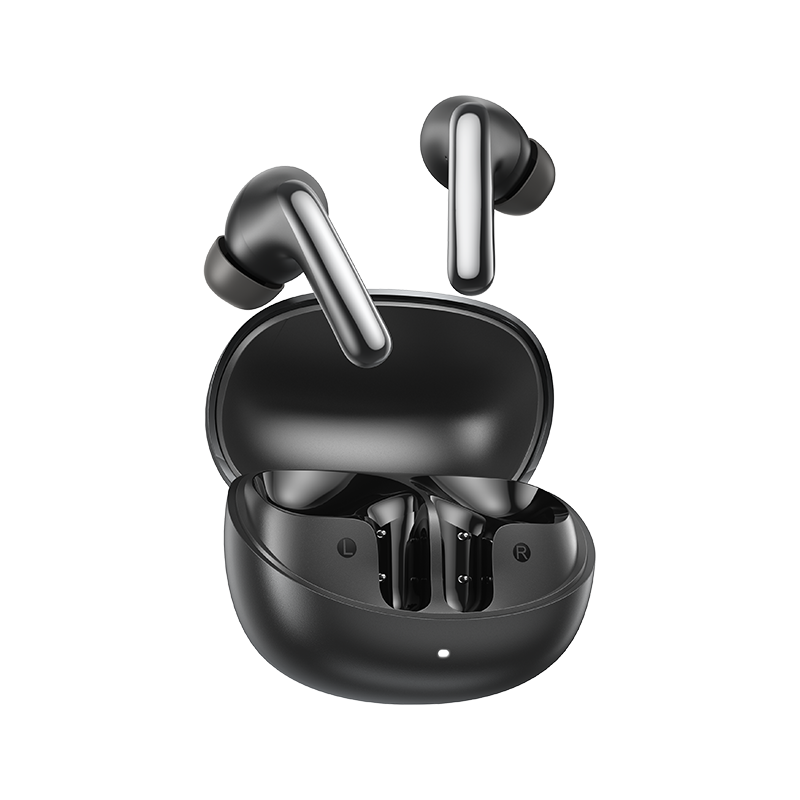
Perguntas frequentes
Como posso verificar o nível de carga da bateria dos auriculares?
Emparelhe os auriculares com a aplicação QCY no seu telemóvel para verificar o nível da bateria.
Para descarregar a aplicação, basta procurar por "QCY" na sua loja de aplicações.
O que devo fazer se os meus auriculares não forem detetados na aplicação QCY?
1. Emparelhe os auriculares com o telemóvel.
2. Abra a aplicação QCY, desça até ao fim da página e clique em "Adicionar dispositivos"."
3. Se aparecer "MeloBuds N60", selecione-o para estabelecer a ligação.
4. Caso contrário, clique em "Configurar manualmente" e selecione "MeloBuds N60" na lista para estabelecer a ligação.
Como estabelecer ligação à aplicação QCY?
1. Descarregue a aplicação QCY.
A aplicação QCY está disponível para dispositivos iOS e Android. Pode ser instalada a partir da Google Play Store ou da App Store.
2. Ligue os auriculares QCY ao seu dispositivo através de Bluetooth (por exemplo, um smartphone ou tablet)
3. Utilize a aplicação QCY para desfrutar de uma experiência de utilização do produto melhorada.
Por que é que a aplicação QCY solicita acesso à localização?
Normalmente, a aplicação em si não necessita de acesso à localização. No entanto, quando se utiliza o Bluetooth Low Energy (BLE) para localizar os seus auriculares, o Android requer autorização de localização.
Se preferir não partilhar a sua localização, feche a aplicação e tente estabelecer a ligação novamente.
Como é que atualizo o firmware?
Atualize o firmware na aplicação QCY
Passos: Abra a aplicação QCY - Definições - Atualização de firmware - Clique em «Atualizar»
O que devo fazer se os auriculares Crossky HT19 ou o estojo de carregamento carregarem lentamente ou não carregarem?
1. Utilize um pano seco ou um cotonete com um pouco de álcool isopropílico para limpar os pinos de carregamento no estojo de carregamento e nos auriculares, de modo a garantir uma melhor ligação.
2. Carregue o estojo de carregamento com um cabo de carregamento e um carregador de parede diferentes e certifique-se de que o estojo de carregamento tem energia suficiente.
Por que razão os níveis de carga das baterias dos auriculares esquerdo e direito não são iguais?
Devido aos diferentes hábitos de utilização e às variações no estado da bateria entre o auricular esquerdo e o direito, é normal que haja alguma diferença no consumo da bateria entre os dois auriculares durante a utilização.
Por que é que os auriculares continuam ligados ao meu dispositivo mesmo depois de os ter colocado no estojo de carregamento com a tampa fechada?
1. Certifique-se de que os auriculares estão bem encaixados no estojo.
2. Limpe os contactos de carregamento, tanto nos auriculares como no estojo, para garantir uma ligação adequada.
O que devo fazer se os auriculares não ligarem quando os retirar do estojo de carregamento?
Os seus auscultadores podem estar sem bateria. Utilize um carregador de 5 V para os carregar durante duas horas.
Quantas vezes o estojo de carregamento do MeloBuds N60 consegue recarregar os auriculares?
A autonomia total da bateria é de 60 horas.
Os auscultadores têm uma autonomia de 9 horas com uma única carga.
É possível emparelhar os auscultadores do ouvido esquerdo e do direito com dois dispositivos diferentes, separadamente?
Não, não podem. Os auriculares podem ser ligados a dois dispositivos ao mesmo tempo através da função «Dual Connection», mas só podem reproduzir áudio de um dispositivo de cada vez.
Os clipes para a orelha esquerda e direita podem ser usados separadamente?
Sim, podem ser utilizados logo após serem retirados do estojo, mesmo que se retire apenas um dos auriculares.
Como posso ativar a ligação multiponto?
1. Depois de ligar o dispositivo A, desligue o Bluetooth
2. Em seguida, ative o Bluetooth no dispositivo B e procure por ligações
3. Reabrir o dispositivo A para obter uma relação de um para dois
Quando dois dispositivos estão ligados: pause a música, o vídeo ou qualquer outro conteúdo áudio no dispositivo atual, clique na música no outro dispositivo e o vídeo passará automaticamente a ser reproduzido.
Como limpar os meus auriculares?
1. Limpeza dos pinos de contacto:
Certifique-se de que o estojo de carregamento está desligado de qualquer fonte de alimentação.
- Utilize um cotonete ou um pano macio humedecido com álcool isopropílico ou um toalhete com álcool para limpar cuidadosamente os pinos de contacto, tanto nos auriculares como no carregador
caso.
2. Limpeza dos filtros dos auriculares:
- Em primeiro lugar, retire as pontas auriculares dos auriculares
Utilize um cotonete embebido em álcool isopropílico para limpar cuidadosamente os filtros.
Como devo cuidar dos meus auriculares?
1. Utilize os seus auriculares regularmente para evitar que a bateria se descarregue em excesso. Tente utilizá-los pelo menos uma vez por mês.
2. Carregue os auriculares após cada utilização e não espere que a carga desça abaixo de 20% para os carregar.
3. Abra o estojo pelo menos uma vez por mês para verificar se tudo funciona e carregue o estojo mensalmente.
4. Limpe regularmente os pinos de carregamento, tanto nos auriculares como no estojo.
5. Mantenha as pontas auriculares limpas e limpe a malha metálica com álcool isopropílico.
6. Se ficarem molhados, use um secador de cabelo na função 'frio' para os secar.
O que posso fazer se os meus auriculares caírem com facilidade?
Disponibilizamos pontas auriculares em vários tamanhos para garantir um bom ajuste.
Para encontrar a opção mais adequada:
1. Certifique-se de que está a usar os auriculares corretos (verifique o logótipo L/R).
2. Experimente pontas auriculares de diferentes tamanhos.
3. Rode ligeiramente os auriculares para encontrar a posição mais segura e confortável.
Posso comprar apenas um dos auriculares, caso tenha perdido um?
Infelizmente, devido a questões relacionadas com os custos de envio e as taxas alfandegárias, não nos é possível vender o estojo de carregamento separadamente
O que posso fazer se o volume estiver baixo quando ligar o meu telemóvel?
Limpeza da rede antipó:
Utilize uma escova de dentes seca para limpar com cuidado a rede de proteção contra o pó dos auriculares. Certifique-se de que não exerce demasiada pressão, para evitar danificá-los.
Posso usar apenas o auricular esquerdo ou direito?
Sim, basta retirar um dos auriculares do estojo de carregamento para o utilizar.
Se estiver a utilizar dois auriculares, pode colocar qualquer um deles de volta no estojo de carregamento e continuar a utilizar o outro isoladamente.
O que posso fazer se os auriculares tiverem má qualidade de som?
1. Ajuste as pontas auriculares: experimente utilizar pontas auriculares de diferentes tamanhos e certifique-se de que os auriculares estão posicionados corretamente para criar um vedante hermético. Isto pode melhorar tanto a qualidade do som como o cancelamento de ruído.
2. Verifique a fonte de áudio: experimente diferentes tipos de música e certifique-se de que a fonte de áudio tem um som nítido e sem distorções nem ruído.
3. Personalize as definições do equalizador: utilize a aplicação QCY para experimentar diferentes modos de equalização ou personalizar o perfil de som de acordo com as suas preferências.
Manuais
Ainda precisa de ajuda?
 Ligue-nos+1 (917) 807-6754
 Enviar comentáriosEnviar aqui
 Converse connosco
 Apoio ao Clienteservice@qcyearphone.com
 Marketing e Parceriasrice@qcyearphone.com
 Contacto para a imprensapr@qcyearphone.com