



Centro assistenza
Assistenza sui prodotti
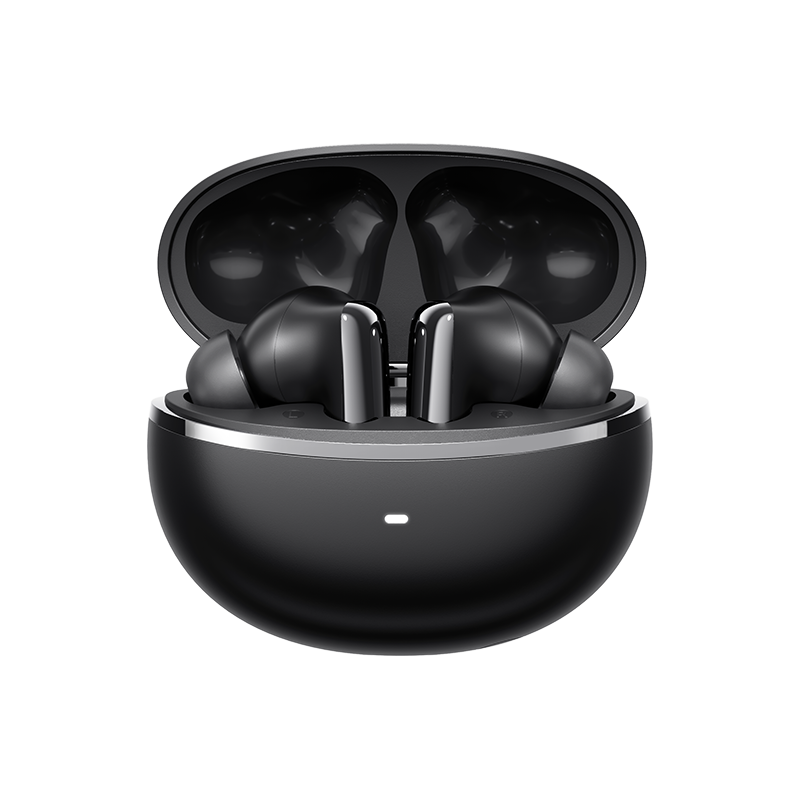
QCY MeloBuds N70
Trova guide ai prodotti, soluzioni ai problemi, manuali e assistenza clienti.
Video di supporto
Domande frequenti
Come si aggiorna il firmware?
Aggiorna il firmware tramite l'app QCY
Procedura: Aprire l'app QCY - Impostazioni - Aggiornamento firmware - Fare clic su Aggiorna
Come posso collegaregli auricolari all'app QCY?
1. Scarica l'app QcY.
L'app QCY è disponibile su dispositivi iOS e Android. Può essere installata dal Google Play Store o dall'Apple App Store.
2. Collega gli auricolari QCY al tuo dispositivo tramite Bluetooth (ad esempio uno smartphone o un tablet)
3. Utilizza l’app QCY per un’esperienza d’uso ancora migliore.
E se il touch screen fosse troppo sensibile?
È possibile regolare la sensibilità dei comandi touch delle cuffie dall'app.
Percorso: Apri l'app QCY - Impostazioni - Regolazione della sensibilità
Perché l'app QCY richiede l'accesso alla posizione?
L'app in sé non richiede normalmente l'accesso alla posizione. Tuttavia, quando si utilizza il Bluetooth Low Energy (BLE) per individuare gli auricolari, Android richiede l'autorizzazione alla localizzazione.
Se preferisci non condividere la tua posizione, chiudi l'app e prova a effettuare nuovamente l'accoppiamento.
Quanto dura la batteria delle cuffie?
L'autonomia complessiva della batteria è di 54 ore e la custodia di ricarica garantisce fino a 10 ore di autonomia con una singola ricarica.
Come faccio a controllare il livello di carica della batteria degli auricolari?
Accoppia gli auricolari all'app QCY sul tuo telefono per controllare il livello della batteria.
Cosa devo fare se gli auricolari non si accendono quando li estraggo dalla custodia di ricarica?
È possibile che le cuffie siano scariche. Si prega di utilizzare un caricabatterie da 5 V per ricaricarle per due ore.
Perché i livelli di carica delle batterie degli auricolari sinistro e destro non corrispondono?
A causa delle diverse abitudini di utilizzo e delle differenze nello stato di salute delle batterie tra l'auricolare sinistro e quello destro, è normale che si verifichino alcune differenze nel consumo della batteria tra i due auricolari durante l'uso.
Come si resetta l'HT18?
Con gli auricolari all'interno della custodia di ricarica, aprire la custodia e tenere premuto il pulsante sulla custodia stessa per 10 secondi. La custodia di ricarica emetterà quindi luci lampeggianti alternate rosse e bianche per 3 secondi. Una volta che il lampeggiamento cessa, il ripristino è completato.
Dopo aver ripristinato le impostazioni di fabbrica, connettiti utilizzando il metodo di accoppiamento iniziale e utilizza il dispositivo normalmente.
Cosa fare se le mie cuffie non compaiono nell'elenco Bluetooth del mio telefono al primo tentativo?
Prova a resettare le cuffie e poi ricollegale; dovresti riuscire a rilevarle.
È possibile accoppiare separatamente gli auricolari sinistro e destro con due dispositivi diversi?
No, non è possibile. Gli auricolari possono essere collegati a due dispositivi contemporaneamente tramite la funzione Dual Connection, ma possono riprodurre l'audio solo da un dispositivo alla volta.
È possibile utilizzare separatamente gli auricolari sinistro e destro?
Sì, possono essere utilizzati subito dopo essere stati estratti dalla custodia, anche se si estrae un solo auricolare.
Come posso abilitare la connessione multipunto?
Per collegare due dispositivi:
1. Abbina le cuffie al dispositivo A.
2. Disattivare il Bluetooth sul dispositivo A: le cuffie entreranno in modalità di accoppiamento.
3. Accoppiare le cuffie al dispositivo B.
4. Riattivare il Bluetooth sul dispositivo A e ricollegarsi alle cuffie.
Una volta completata questa configurazione iniziale, la prossima volta le cuffie si connetteranno automaticamente a entrambi i dispositivi.
Come pulire gli auricolari?
1. Pulizia dei pin di contatto:
Assicurarsi che la custodia di ricarica sia scollegata da qualsiasi fonte di alimentazione.
Pulisci i contatti di ricarica degli auricolari e della custodia di ricarica con un cotton fioc imbevuto di alcol.
2. Pulizia dei filtri degli auricolari:
Per prima cosa, rimuovere i puntali dagli auricolari
.Utilizza una spazzola a setole morbide per pulire il filtro antipolvere/la presa d'aria delle cuffie.
Come devo prendermi cura dei miei auricolari?
1. Usa regolarmente gli auricolari per evitare che la batteria si scarichi eccessivamente. Cerca di usarli almeno una volta al mese.
2. Ricarica gli auricolari dopo ogni utilizzo e non aspettare che il livello di carica scenda al di sotto del 20% prima di ricaricarli.
3. Aprire la custodia almeno una volta al mese per verificare che tutto funzioni correttamente e ricaricarla mensilmente
4. Pulisci regolarmente i contatti di ricarica sia degli auricolari che della custodia.
5. Tieni puliti i gommini degli auricolari e pulisci la rete metallica con alcol denaturato.
6. Se si bagnano, asciugali con un asciugacapelli impostato sulla funzione 'freddo'.
Cosa posso fare se gli auricolari mi cadono facilmente?
Offriamo auricolari di diverse misure per garantire una perfetta vestibilità. Per trovare la misura più adatta:
1. Assicurati di indossare gli auricolari corretti (controlla il logo L/R).
2. Prova diverse misure di puntali.
3. Ruota leggermente gli auricolari per trovare la posizione più stabile e comoda.
Posso acquistare solo uno degli auricolari se ne ho perso uno?
Purtroppo, a causa di problemi legati alle spese di spedizione e ai dazi doganali, non possiamo vendere la custodia di ricarica separatamente.
Cosa fare se l'effetto di cancellazione del rumore non è soddisfacente?
1. L'HT18 vanta una qualità audio Hi-Fi ad altissima definizione. Il nostro HT18 utilizza altoparlanti MEMS, che migliorano notevolmente le frequenze alte e ultra-alte. Tuttavia, questo miglioramento delle alte frequenze limita in qualche modo le prestazioni di cancellazione del rumore alle alte frequenze dell'HT18.
2. Si prega di utilizzare una modalità di cancellazione del rumore diversa nell'app QCY (non quella adattiva). In questo modo si otterrà lo stesso effetto dell'HT08.
Se la cancellazione del rumore continua a non funzionare, puoi disattivare la modalità di cancellazione adattiva del rumore e passare alla 'Modalità Rumorosa' nell’app, impostandola al massimo livello di cancellazione del rumore.
La modalità adattiva regola l'intensità della cancellazione del rumore in base alle condizioni ambientali (maggiore rumore ambientale, maggiore intensità di cancellazione; minore rumore ambientale, minore intensità di cancellazione), garantendo un'esperienza di cancellazione del rumore più confortevole e riducendo il fastidio causato dalla pressione sulle orecchie in ambienti idonei.
Cosa posso fare se il volume è basso quando mi connetto al mio telefono?
Pulizia del filtro antipolvere:
Utilizza uno spazzolino da denti asciutto per pulire delicatamente il filtro antipolvere degli auricolari. Fai attenzione a non esercitare una pressione eccessiva per evitare di danneggiarli
Perché l'audio proviene solo da un lato degli auricolari?
È possibile che le cuffie non siano sincronizzate. Si prega di ripristinare le cuffie.
Manuali
Hai ancora bisogno di aiuto?
 Chiamaci+1 (917) 807-6754
 Invia un feedbackInvia qui
 Chatta con noi
 Assistenza clientiservice@qcyearphone.com
 Marketing e collaborazionirice@qcyearphone.com
 Richieste della stampapr@qcyearphone.com